
Here is a step-by-step guide to :-
1. Register a new profile
2. Register a new vehicle
3. Register a new Rider
4. Finally, register for an Event on our MSF Racing Online Registration & Payment System
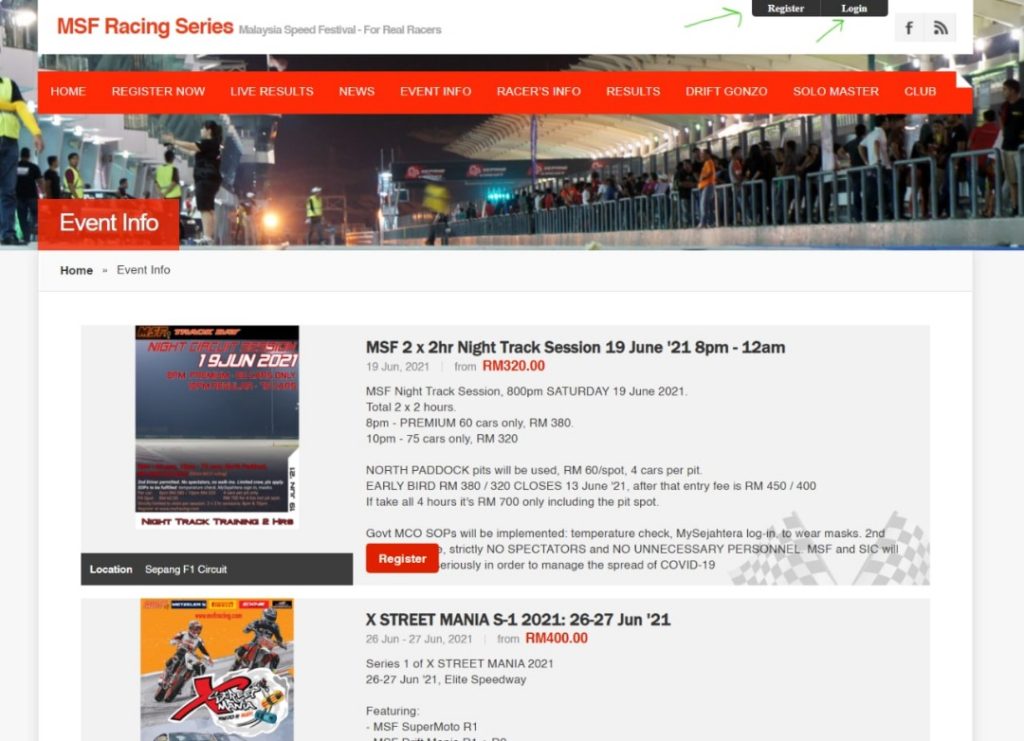
STEP 1 : At the events screen, please log-in. If this is your first time with MSF, then please REGISTER a profile. Please endure you enter the correct Handphone number as the system will send you a message for confirmation when you register.
LANGKAH 1 : Log-in akaun anda di skrin ‘Events’. Sekiranya ini kali pertama anda menyertai MSF, sila DAFTAR profil profil anda dahulu. Pastikan anda memasukkan nomber H/P yang betul untuk menerima mesej pengesahan dari kami.
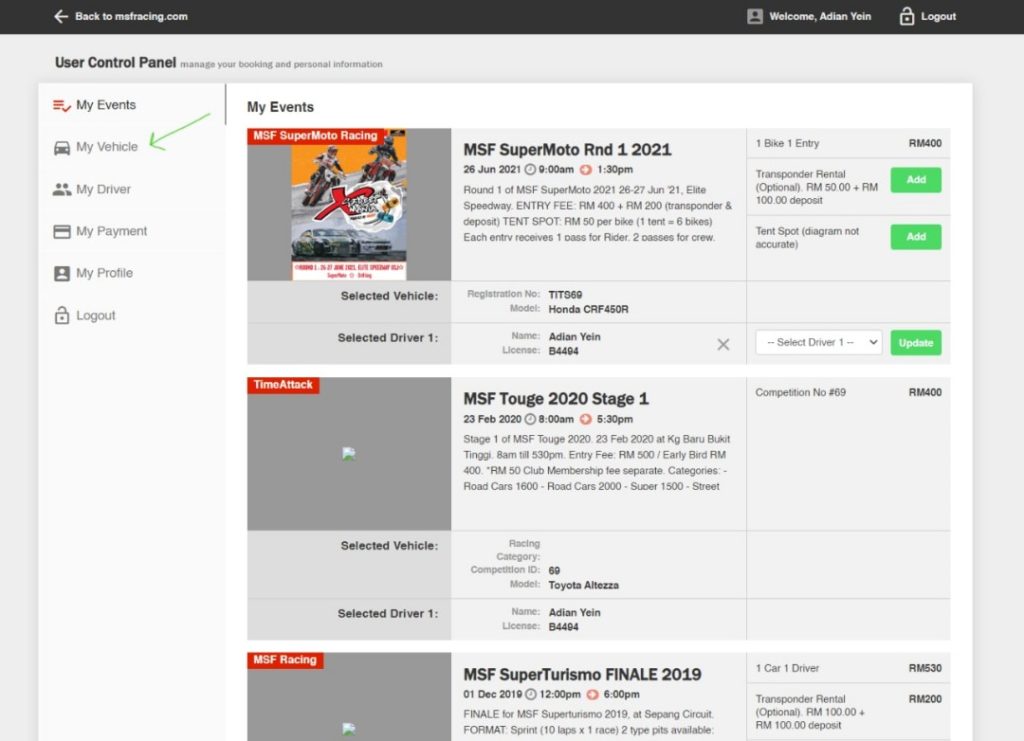
STEP 2 : You will then see the main panel. It will look something like this. You may need to REGISTER a new VEHICLE (Supermoto) and if so, click on the MY VEHICLE button on the left.
LANGKAH 2 : Seterusnya, anda akan melihat panel utama seperti ini. Sekiranya anda perlu mendaftar kenderaan baru (Supermoto), klik butang ‘MY VEHICLE’ dibahagian kiri skrin.
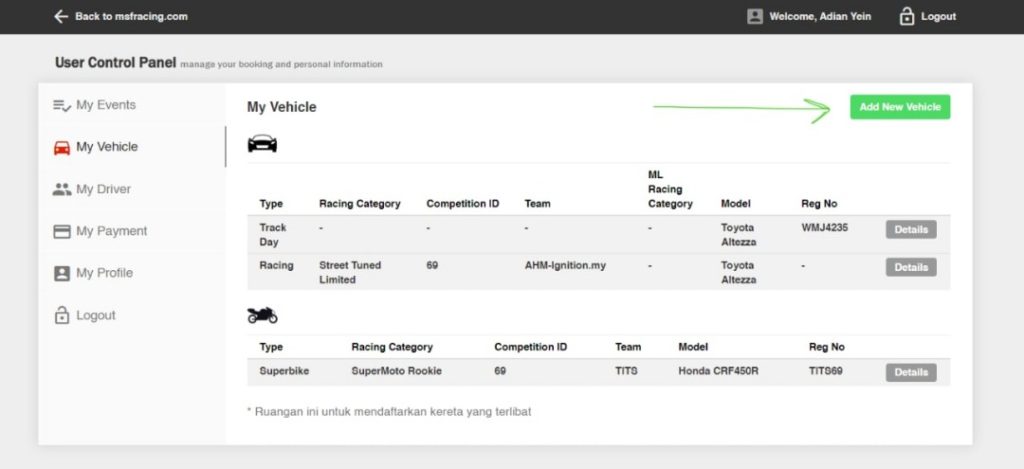
STEP 3 : Your screen may look something like this if you have existing vehicles registered under your profile. This is because 1 profile may have several DRIVERS / RIDERS as well as several VEHICLES registered under it, therefore for you acting in the role of Team Manager (because some riders/ drivers malas to do themselves la kan haha). If this is your first time though, it will be empty. Click on ADD NEW VEHICLE on the upper right side.
LANGKAH 3 : Skrin anda akan kelihatan seperti ini jika anda mempunyai kenderaan yang telah didaftarkan di bawah profil anda. 1 profil boleh daftar lebih dari 1 PEMANDU / RIDER serta KENDERAAN yang didaftarkan di bawahnya. Pengurus pasukan boleh mendaftar bagi pihak driver/rider. Sekiranya ini adalah kali pertama anda, tiada info akan dipaparkan. Klik ADD NEW VEHICLE di sebelah kanan atas.
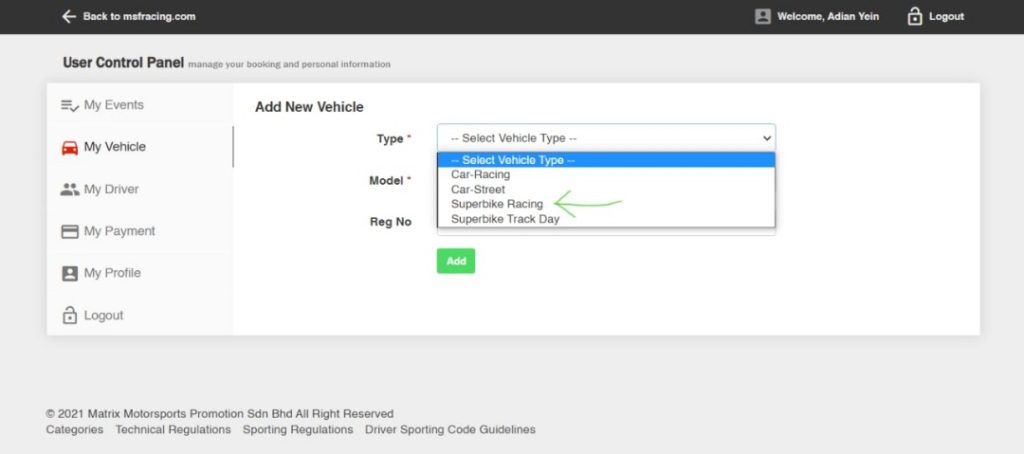
STEP 4 : You will see this screen, pull the first drop-down menu, and select which category of vehicle you will be adding. If it is for MSF Supermoto, then actually the system puts it under 2-wheels, so please select SUPERBIKE RACING. Make sure it is the ‘RACING’ one ya not track day.
LANGKAH 4 : Anda akan melihat skrin ini. Pilih kategori kenderaan mana yang akan anda tambahkan. Bagi MSF Supermoto, sistem meletakkanya di bawah ‘2-wheels’, jadi pastikan anda memilih SUPERBIKE RACING. Pastikan ia adalah ‘RACING’ dan bukan ‘track day’.
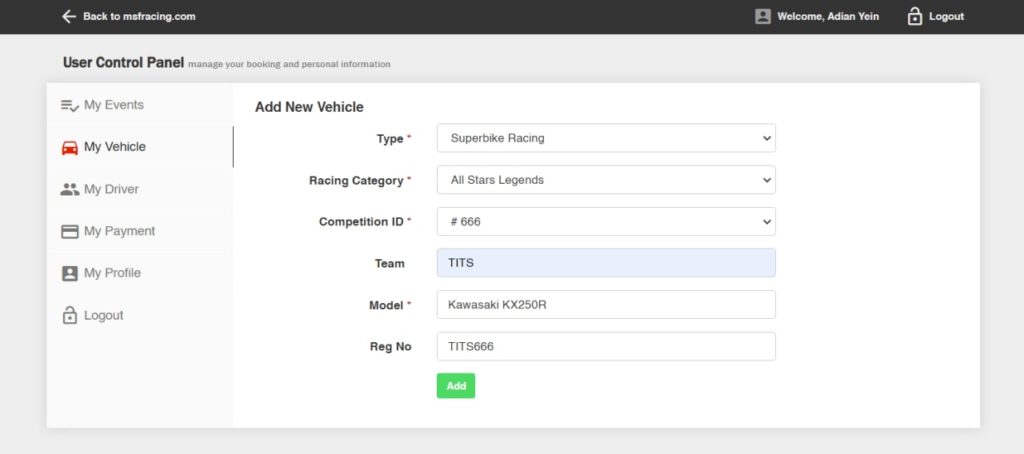
STEP 5 : Once you do that, you’ll see the screen change, and you’ll be presented with a drop-down menu for Categories. Now, this is IMPORTANT: choose the Supermoto categories. For All Star please make sure you choose All Stars Pro or All Stars Legends if you are, errr.. ‘experienced’ a bit. DO NOT CHOOSE THE NORMAL ‘ALL STAR’ as this is a Superbike category and you will not be listed under Supermoto ! Or if you are a non-graded rider, then you will be in Supermoto Advanced or Supermoto Rookie (depending on your laptime – be honest!) but anyhow during qualifying you may be bumped up a category if your laptime is within the next upper laptime bracket.
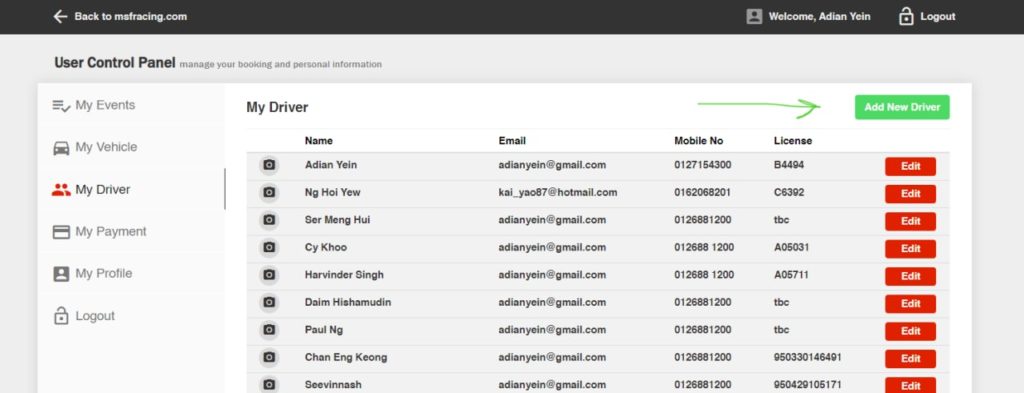
STEP 6 : ADDING A RIDER : If you have not already done so, you MUST also register a Rider whom you will choose to be riding the bike. To do that, on the left bar click on MY DRIVER and then from there click ADD NEW DRIVER.
LANGKAH 6 : MENAMBAHKAN RIDER : Sekiranya anda belum menambah rider, anda HARUS mendaftarkan Penunggang yang akan menyertai XSM. Untuk melakukannya, di bar kiri klik MY DRIVER dan klik TAMBAHKAN PEMANDU BARU.
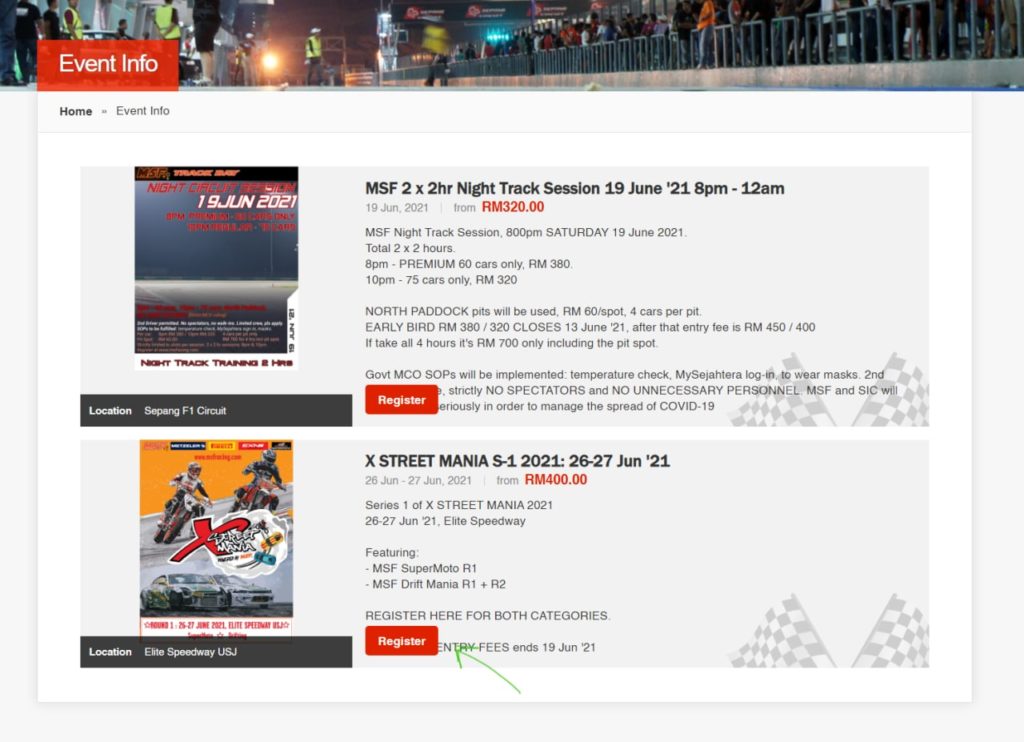
STEP 7 : REGISTER : For the Event. Once you have created a Vehicle Profile and Rider Profile, go back and click on REGISTER to register and make payment for the event.
LANGKAH 7 : PENDAFTARAN : Setelah anda membuat Profil Kenderaan dan Profil Penunggang, klik pada butang REGISTER untuk mendaftar dan membuat pembayaran untuk acara tersebut.
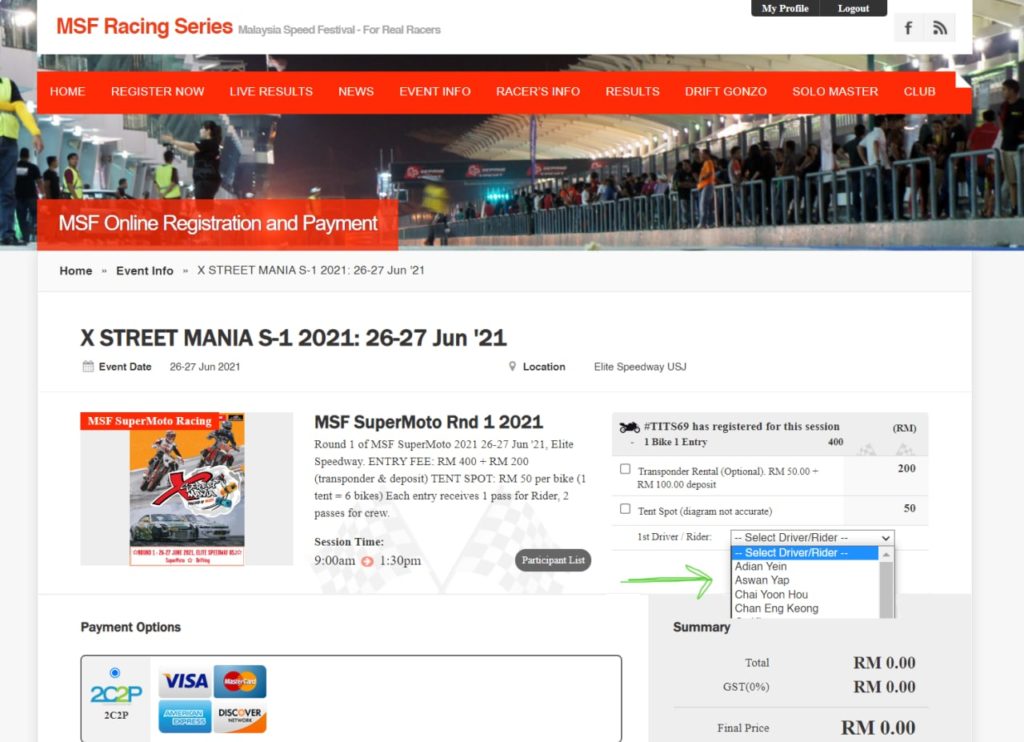
STEP 8 : You will then see the screen below. Just select the VEHICLE which you are going to register for the event. If you do not have your own MYLAPS TIMING TRANSPONDER, you will need to rent this too (and it includes a refundable security deposit of RM 100 which will be returned at the end of the event when you return the transponder). You can also choose to rent a TENT SPOT if you wish. PLEASE TAKE NOTE that you must select a Rider from the pull-down menu before you can finalise and make payment. Once done, the total bill will come up at the bottom, then you just go to the next screen and proceed to make your online payment.
LANGKAH 8 : Seterusnya, skrin anda akan memaparkan seperti ini. Pilih kenderaan yang akan anda daftarkan untuk acara. Sekiranya anda tidak mempunyai MYLAPS TIMING TRANSPONDER anda sendiri, anda boleh menyewa dan ia termasuk ‘security deposit’ sebanyak RM 100 yang akan dikembalikan di penghujung acara (setelah anda mengembalikan transponder). Anda juga boleh memilih untuk menyewa ‘TENT SPOT’ jika anda mahu. Pastikan anda telah memelih Penunggang dari menu sebelum anda dapat membuat pembayaran. Setelah selesai, jumlah bil akan tertera di bahagian bawah dan anda boleh menyelesaikan pembayaran di page seterusnya.
And that is it ! Setel !